Section headers
Insert the song part headers Genius expects, for the language the lyrics are written in.
Insert a header
A section is a header followed by its lyrics, such as [Verse 1] or [Chorus]. A blank line ends one section and starts the next.
There are three ways to add a header:
- After a blank line, the new section shows a + Add section header row above its first line. Press it.
- Put the cursor in the section and press CtrlShiftHor CommandShiftHon a Mac, or press the
[+]Section header button in the editor's action bar. - On the finding This lyric section has no header., press Choose header.
Each one opens the same picker:
- Type to filter the list, or move through it with the arrow keys.
- Press Enter or click a header to insert it.
- To leave the lyrics unchanged, press Esc or Cancel.
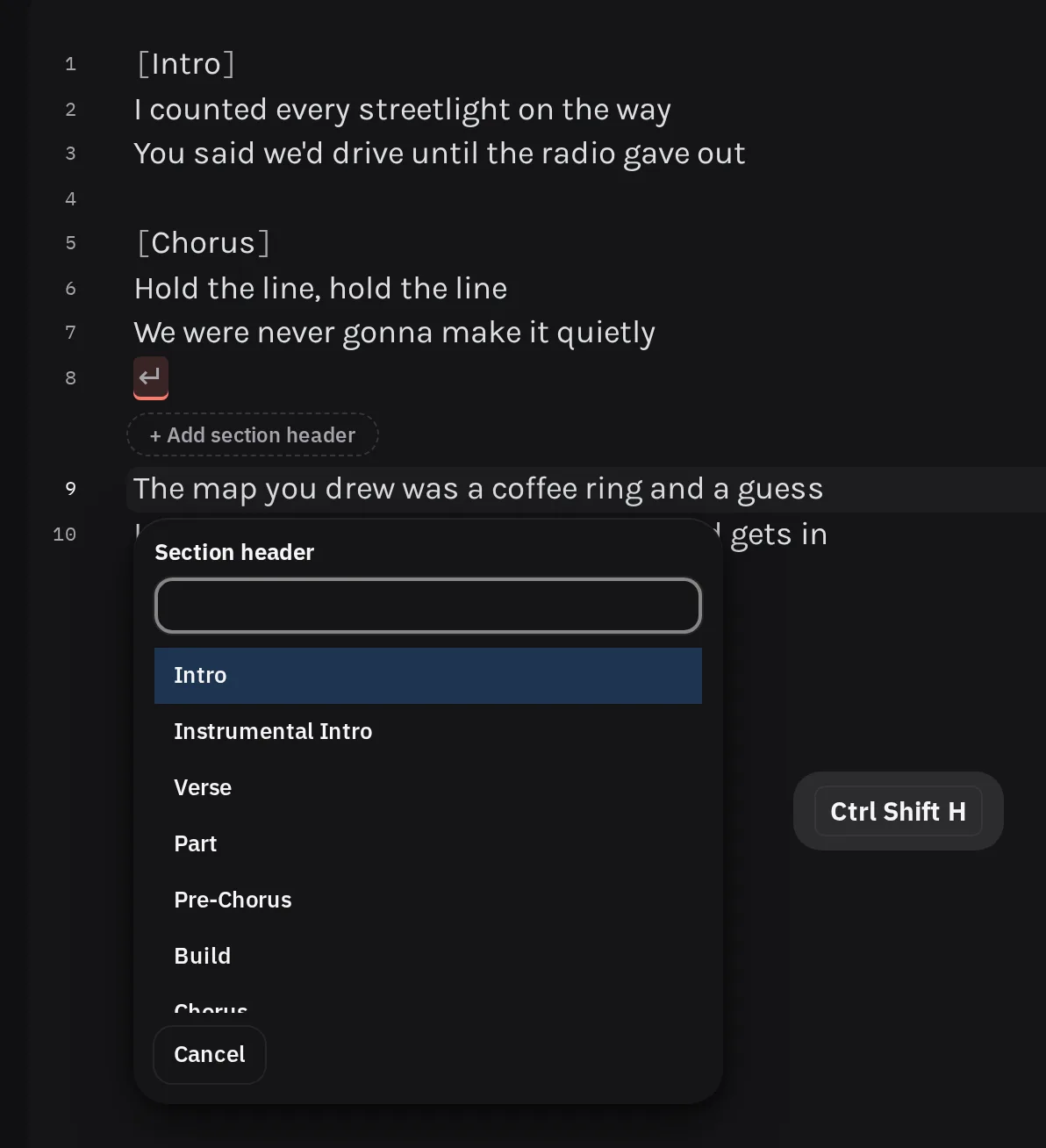
The list follows a typical song, from Intro to Outro, and filtering never reorders it. For a header that is not in the list, type it and choose Use “…”.
The header goes in as one step you can undo, and the cursor moves to the line below it, ready for lyrics. If the section already has a header, CtrlShiftHor CommandShiftHon a Mac starts a new section at the cursor's line instead of replacing it.
A header that no reviewed list contains becomes a Manual review finding, in case it is a typo. If you meant it, press It's correct.
Numbering and repeats
Genius numbers verses and nothing else. Every chorus is [Chorus], however many times
it comes back.
- The picker suggests the next verse number from the verses above the cursor, so a second verse
is offered as
Verse 2. - Inserting a verse between two others renumbers the verses after it in the same step.
- Once two verses have different words, a finding offers Number the verses for any that are still unnumbered or out of order.
- A song with only one distinct verse leaves it unnumbered, even when that verse repeats.
- An exact repeat of a verse keeps the number of its first appearance.
Write repeated lyrics out in full. A placeholder such as [Chorus x2] or (Repeat chorus) is a warning, and LyricLint does not expand it for you, because it cannot
know which earlier section you mean.
When a part repeats immediately, keep both copies under one header with no blank line between them. Two identical sections back to back get a warning that says so.
To keep repeated choruses identical while you correct them, link them. The checks behind this section are verse numbering, repeat placeholders, and immediate repeats.
Headers in other languages
The picker lists headers for the 'scribe's lyric language. Change it with the language button in the toolbar, which shows the current language. If the lyrics look like a different language, a finding offers Set language to ….
These languages have reviewed header lists:
| Language | Headers |
|---|---|
| English | Verse, Chorus, Bridge |
| Norwegian | Vers, Refreng, Bro. Use Chorus instead of Refreng when the song also has a Pre-Chorus or Post-Chorus. |
| German | Part and Hook (common in rap) or Strophe and Refrain. Both pairs are accepted. |
| Spanish | Verso, Coro or Estribillo, Puente |
| French | Couplet, Refrain, Pont |
| Arabic | المقطع, اللازمة, جسر |
| Japanese | English headers, as Genius Japan requires. |
| Korean | English headers for original songs. Hangul terms such as 코러스 are also
accepted, for translations. |
If a header uses another language's word for the part, such as [Chorus] in a Spanish
'scribe, a finding offers the reviewed term for the 'scribe's language.
For any other language, the picker has no list yet. Type the header and choose Use “…”. The guide's non-English songs and section headers topics explain the conventions.