YouTube, Apple Music, and Spotify
Play the song from a streaming service instead of a file, and copy its details.
Choose a source
Open the audio dialog with the music note at the top right of the editor (Add audio source). Each streaming source has its own field, and under each field a line of facts says what using it involves. Nothing contacts a streaming service until you press a button in its row, with one exception, noted under Apple Music.
YouTube needs no account.
- In Search YouTube, or paste a link, type the song's name and press Search, then pick a result. A pasted video link attaches straight away. (A copy of LyricLint built without YouTube search shows a link field and a Use video button instead.)
- The video plays in a small frame at the bottom right of the editor. YouTube's terms require the player to stay visible, so it cannot be hidden.
A search sends your words to Google. Playback loads YouTube's player from youtube-nocookie.com and needs a connection. Your press on a video is your permission for YouTube to load, and it lasts until you close the tab.
When there is no search, or it finds nothing, a Search YouTube link under the field looks the song up on youtube.com in a new tab, so you can copy a link from there.
Apple Music plays full songs for Apple Music subscribers.
- Type the song's name, or paste an Apple Music link, into the Apple Music field and press Search. Searching needs no account.
- Pick a result. The first time, Apple asks you to sign in with your Apple Account in a pop-up window. If your browser blocks it, allow pop-ups for LyricLint and press the result again.
So that the sign-in window can open on your press, opening the audio dialog loads Apple's MusicKit script. A search sends your words to Apple's catalogue.
Apple Music appears only while this copy of LyricLint holds a valid Apple Music key. The public site does.
The public LyricLint site does not offer Spotify. It appears only in copies of LyricLint set up with their own Spotify app, and even there only accounts that app allows can sign in.
- Type the song's name, or paste a Spotify link, into the Spotify field and press Search.
- The first time, LyricLint takes you to Spotify to sign in, then brings you back to your search, or attaches the song if you pasted a link.
Spotify needs a Premium account. It has no speed control, so the speed menu offers only 1× while a Spotify song is attached. The sign-in lasts until you close the tab.
Whichever source you choose, the player and its keys work the same way. See Playing the song.
Song details and artwork
A song from Apple Music or Spotify brings its cover art and name, shown above the player. Press the cover to see it larger.
The Song tab lists what the catalogue knows about the song under Song metadata. From Apple Music that can be the release date, writers, album, label, and ISRC. Press any value to copy it; each writer's name copies on its own. These are the facts you fill in on a Genius song page.
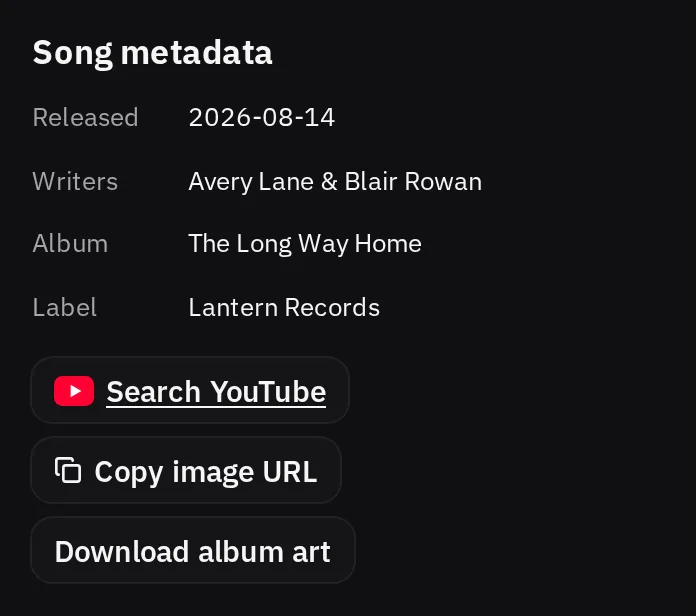
For the cover, Copy image URL copies its address and Download album art saves the image. With a YouTube video, the Song tab offers Copy YouTube link instead.
Loading a remembered song
A 'scribe remembers its streaming song, but LyricLint does not contact the service again until you ask. When you reopen the 'scribe, the player shows Load audio with the song's name. Press it, or Esc, to load the song where you left it.
Within one visit, a YouTube video you already allowed, or a Spotify song while you are still signed in, loads without asking. Apple Music always waits for your press.